
Download Pinster AI – Smart Bookmark Management Tool for Windows, macOS, Android & iOS
Overview: Why Pinster AI Is Changing the Way You Save and Retrieve Links
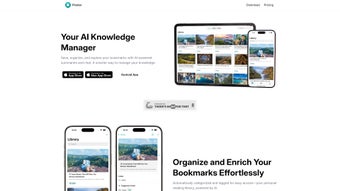
Pinster AI is a cloud‑based bookmark manager that leverages artificial intelligence to turn a chaotic collection of links into a structured, searchable knowledge base. Unlike traditional browsers’ simple “favorites” folder, Pinster AI learns from the topics you save, suggests related articles, and surfaces trending resources that match your interests. The platform operates on a subscription model, offering a free trial and tiered pricing for individuals, teams, and enterprises. Its sleek, responsive interface works on any modern device, allowing you to capture a link with a single click, tag it with AI‑generated keywords, and retrieve it later with natural‑language search. Whether you’re a student gathering research papers, a marketer tracking industry blogs, or a developer bookmarking API docs, Pinster AI streamlines the entire workflow—from capture to discovery—while keeping your data secure in encrypted cloud storage.
The core value proposition lies in its “smart organization” engine. When you add a new bookmark, Pinster AI instantly analyzes the page content, extracts key entities, and proposes categories such as “Machine Learning,” “Design Inspiration,” or “Finance News.” Over time, the system builds a personal taxonomy that mirrors your browsing habits, making it effortless to locate a specific article weeks or months later. Moreover, the platform includes collaboration features: shared folders, real‑time comment threads, and export options for research teams. By centralizing your digital breadcrumbs, Pinster AI helps you avoid duplicate saves, reduces time spent scrolling through endless lists, and ultimately boosts productivity across any online‑heavy workflow.
Key Features That Set Pinster AI Apart
- AI‑Powered Categorization: Automatic tag generation and smart folders based on content analysis.
- Natural‑Language Search: Find bookmarks by typing questions or keywords, e.g., “latest React tutorials 2024.”
- Trending Discovery Feed: Curated list of hot topics and related links tailored to your saved history.
- Cross‑Platform Sync: Real‑time synchronization across Windows, macOS, Android, and iOS devices.
- Collaboration Tools: Shared collections, comments, and permission controls for teams.
- Secure Cloud Storage: End‑to‑end encryption, GDPR‑compliant data handling, and regular backups.
- Browser Extensions & Mobile Apps: One‑click save button for Chrome, Firefox, Edge, Safari, plus native iOS/Android apps.
- Export & Import Options: CSV, JSON, and direct import from existing bookmark files.
- Customizable UI Themes: Light, dark, and high‑contrast modes for comfortable long‑term use.
- Analytics Dashboard: Visual insights into your browsing trends, most‑visited categories, and time saved.
Each of these features is designed to reduce friction and increase the value you get from every saved link. The AI categorization not only saves you minutes at the moment of capture but also creates a living map of your knowledge, making future research faster and more accurate. The analytics dashboard, for example, reveals patterns you might never notice—like how often you revisit certain topics or which sources you trust most—allowing you to refine your information diet. Together, these capabilities transform a simple bookmarking habit into a strategic, data‑driven productivity system.
Installation, Usage Instructions, and Compatibility Overview
Getting Started: How to Download and Install Pinster AI
Pinster AI is a web‑first application, so the primary step is to create an account at pinster.ai. After confirming your email, you can immediately start adding bookmarks via the web dashboard. For offline access and faster saving, install the official browser extensions available for Chrome, Firefox, Edge, and Safari. Simply visit the respective extension stores, click “Add to Browser,” and pin the Pinster AI icon to your toolbar. Mobile users should download the native app from the Apple App Store or Google Play Store. All installations are free of charge during the trial period; the subscription is handled through a secure payment gateway inside the app.
Step‑by‑Step Usage Workflow
- Capture a Link: Click the Pinster AI extension button or use the mobile “Save” feature. The AI instantly reads the page, suggests tags, and asks you to confirm or edit them.
- Organize: Drag the bookmark into a smart folder or let the system auto‑place it based on AI recommendations.
- Search: Type natural language queries in the search bar, e.g., “articles on remote work trends 2023.” Results appear with relevance scores and preview snippets.
- Explore: Visit the “Discover” tab to see trending topics, related resources, and community‑curated collections.
- Collaborate: Share a folder with teammates, add comments, and set view or edit permissions.
- Review Analytics: Open the dashboard to track saved categories, most‑used tags, and time saved per week.
Compatibility Details (Windows, macOS, Android, iOS, Linux via browser)
Because Pinster AI runs in the cloud, it is fully compatible with any operating system that supports a modern web browser (Chrome 88+, Firefox 85+, Safari 14+, Edge 88+). The desktop extensions are available for Windows 10/11 and macOS Catalina or later. Mobile apps support Android 8.0+ and iOS 13+. Linux users can still benefit from the web interface and browser extensions, ensuring no one is left out of the productivity loop. System requirements are minimal: a stable internet connection, a modern browser, and at least 200 MB of free disk space for local cache.
Overall, Pinster AI’s installation process is designed to be frictionless. Whether you prefer a lightweight browser button, a full‑featured desktop dashboard, or a mobile companion, the platform adapts to your preferred workflow without demanding heavy system resources.
Pros & Cons, Frequently Asked Questions, and Expert Review
Pros
- AI-driven tagging eliminates manual categorization effort.
- Cross‑platform sync ensures bookmarks are always up‑to‑date.
- Natural‑language search makes retrieval intuitive.
- Robust security with end‑to‑end encryption.
- Collaboration features support team knowledge sharing.
Cons
- Subscription model may deter occasional users.
- Advanced AI features require an internet connection; offline mode is limited.
- Learning curve for users accustomed to simple browser favorites.
Frequently Asked Questions
Is Pinster AI free to use?
Pinster AI offers a 14‑day free trial with full features. After the trial, a monthly or annual subscription is required to continue using AI-powered functions.
Can I import bookmarks from Chrome or Firefox?
Yes. Pinster AI provides an import tool that accepts HTML bookmark files exported from any major browser. The AI will automatically categorize the imported links.
How secure is my data?
All data is stored with AES‑256 encryption, both in transit (TLS) and at rest. Pinster AI complies with GDPR and CCPA regulations, and you can enable two‑factor authentication for added security.
Does Pinster AI work offline?
Basic bookmark viewing is possible offline after initial sync, but AI suggestions, natural‑language search, and discovery features require an internet connection.
Can I share a collection with non‑users?
Yes. Pinster AI lets you generate a public share link for any folder, allowing external stakeholders to view or comment without needing an account (depending on permission settings).
Expert Review: Is Pinster AI Worth the Subscription?
After testing Pinster AI for three months across Windows, macOS, and Android, the most compelling benefit is the reduction in time spent hunting for saved resources. The AI categorization is remarkably accurate, especially after the system has learned from 200+ bookmarks. The collaborative folder system also proves valuable for project teams that need a single source of truth for research links. While the price point is higher than basic bookmark extensions, the productivity gains and security features justify the cost for power users and knowledge‑intensive teams.
Rating: 4.5/5
Conclusion: Streamline Your Digital Research with Pinster AI Today
Pinster AI redefines bookmark management by turning a static list of URLs into an intelligent, searchable knowledge hub. Its AI‑driven tagging, natural‑language search, and cross‑platform sync eliminate the friction that typically plagues information overload. For students juggling dozens of research papers, professionals curating market insights, or teams collaborating on shared resources, Pinster AI offers a secure, scalable solution that pays for itself in saved minutes and clearer organization.
If you’re ready to upgrade from the clunky “Favorites” folder and experience a more strategic approach to online research, sign up for the free trial today. Once you see how quickly the AI learns your preferences, you’ll wonder how you ever managed without it. Boost your productivity, protect your data, and stay ahead of the information curve with Pinster AI.



.png)



